Same Pictures, an Eighth of the Weight

Photo by Philip Oroni on Unsplash
This site has used JPEG and PNG images since the first page. I never thought about it. Then I read about AVIF, a newer image format, and I asked Claude if it was worth the change.
Claude answered with measurements. It converted some of my real images and compared the sizes. One screenshot from Strataris was 4.65 MB. As an AVIF, it was 67 KB.
So yeah, I just had to take this further.
Why so large?
AVIF was only half of it. Some of my header photos were 3,200 pixels wide. The column they sit in is 800 pixels wide, and a Retina screen needs 1,600 at most. I was effectively sending pixels nobody would see.
The build pipeline now fixes both. When I add a JPG or a PNG, the build makes a smaller copy. The copy is the largest size that the site ever draws the image. Then the build makes an AVIF of it. Icons get a smaller limit, because the site never draws one wider than 128 pixels.
The HTML offers both files. A browser that can read AVIF takes the AVIF. Safari has read AVIF since version 16, Chrome since 85 and Firefox since 93. An older browser takes the resized JPG or PNG.
I still add full-size originals, and I never touch the generated files. That part mattered most to me. Nothing about how I write a post had to change.
What it saved
Some single images:
| Image | Before | After |
|---|---|---|
| A Strataris screenshot (PNG, 3,200 pixels wide) | 4.65 MB | 67 KB |
| The photo at the top of Typography Matters (JPG) | 1.64 MB | 89 KB |
| The Browser Notes icon (PNG, 1,024 pixels wide) | 1.17 MB | 10 KB |
| A Citadel banner (JPG, already small) | 67 KB | 15 KB |
| My photo on the About page | 41 KB | 16 KB |
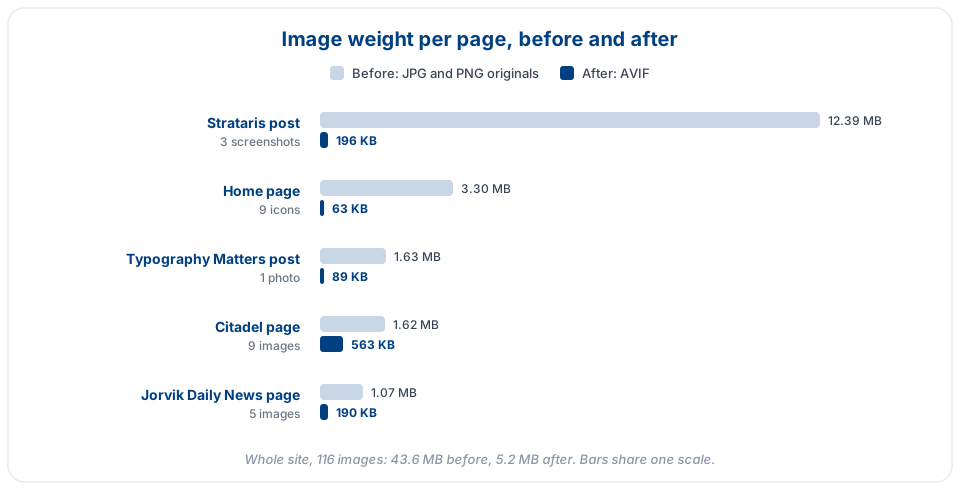
The Strataris post gained the most. It went from 12.39 MB to 196 KB. I had put three full-resolution PNG screenshots in it and never checked their size. That one is on me.
Citadel gained the least, because its screenshots were already sensible JPGs.
I was worried about the screenshots. Small text and thin lines show compression first, so PNG screenshots get a higher quality setting than photos. I compared them at full size, side by side. I could not tell them apart.
The two editors
I write posts in my Notes Editor, and I edit the rest of the site in my Web Editor. I built both of them. I expected to change both.
The Notes Editor needed nothing. It publishes by running the site’s own build script, so it got the AVIF step for free.
The Web Editor needed two small fixes. Its preview pane changes image addresses so that they load from the disk. It knew about src, but not about srcset, which the new <picture> tags use. So every converted image showed as broken in the preview. The editor also did not know that .avif is an image. It would have opened one as text, and a save would have destroyed it.
Then Claude found a larger problem. The Web Editor has a Visual mode, for editing a page as it looks. If I typed one word in it and saved, it wrote the browser’s version of the page over my file. The doctype and the whole <head> disappeared. Every … became a literal ellipsis.
A page that contained ${ opened empty, and one keystroke and a save put that empty page over the file. Visual mode also kept the old page when I opened a different file. A save then put that page into the new file.
I had never noticed.
Web Editor 1.0.26 fixes all of it. Visual mode now edits only the body of a page, and it writes back only the characters I change. Everything else keeps its exact bytes.
One more thing broke, on my staging server only. It copied .jpg files from the top folder of the site but not .avif files, so my photo on the About page was missing there. That took one line to fix.