My AI Had Amnesia, So I Built It a Memory

Photo by zhengtao tang on Unsplash
Claude is the best pair-programmer I have ever worked with. It can untangle a Metal voxel raycaster at two in the morning, spot a retain cycle I would have stared straight past for a week, and write a release script that actually handles the edge cases. It also has the long-term memory of a goldfish.
Every new session starts from nothing. It does not know that Jorvik screensavers (going forward) ship as standalone apps rather than .saver bundles (lessons learned from Rainy Day). It does not know that JorvikKit is copied into each app’s source tree rather than pulled in as a package. It does not know which app talks to which, what the release pipeline looks like, or — and this one stung — which projects I have quietly abandoned and why. So every session began with me typing the same paragraphs of estate lore into the prompt like a man introducing himself to his own dog each morning.
The estate is not small either. Around thirty apps, a handful of games, a shared Swift library, a release tool, a website, and a thick book of conventions I have accreted over a couple of years of software development. Re-explaining all of that, every time, is not “using an AI assistant.” It is being an unpaid narrator.
So I built it a memory. A real one — persistent, searchable, self-maintaining, and running entirely on my own machine with no cloud and no API bill. This is the whole path, bugs and all, because the bugs are where the actual lessons live. In theory you should be able to point your own LLM at this post and have it rebuild the thing for your own projects.
What I actually wanted
Not “a chatbot that remembers my name.” I wanted Claude to walk into a session already holding the estate the way a colleague of two years would: able to answer “which apps would break if I change JorvikKit’s About window,” able to tell me that Rescue on Fractalus1 is dead and when it died, able to write a new app’s README in the house style without being re-taught the house style. And critically: I wanted it to keep that knowledge current on its own, because a memory that goes stale is worse than no memory at all. A confidently wrong assistant is a liability.
A few hard requirements fell out of that:
- It has to be local. The estate is mine. I am not shipping my entire architecture off to someone else’s servers to get indexed.
- It has to cost nothing per query. If remembering things has a meter running, I will use it sparingly, and a memory you are afraid to use is not a memory.
- It has to survive sessions, restarts, and the machine being asleep.
- It has to be maintainable by the assistant itself, not by me hand-feeding it facts forever.
Three layers, because memory is not one thing
The mistake I nearly made was reaching for one big store. But “what is the README convention” and “which apps use JorvikKit” and “do not put a Co-Authored-By line in my commits” are three completely different asks, and trying to answer all three from one bucket gives you a mediocre answer to each.
So the memory is three layers, each answering the question it is actually good at.
Layer one: a knowledge base it can read AND write
This is the reference library. Long-form prose: a document per app, per game, per convention, per piece of infrastructure, plus the philosophy posts and run-books. “How does the release pipeline work.” “What is the menu-bar pill design.” “Why do I not ship preferences.” Full text, searchable.
The build is unglamorous and that is the point. A search engine (I used MeiliSearch because it is small, fast, and runs in a single container) sits behind a little Node service. The Node service does three jobs: it ingests Markdown files from a folder of category subdirectories, it watches that folder for changes, and it exposes a small HTTP API. On top of that sits an MCP server — the bit Claude actually talks to — exposing a handful of tools: search, list, get, create, and update.
That create and update pair is the part most people skip, and it is the part that matters. The knowledge base is not read-only. Claude can write back to it. When we work something out together — a new convention, a gotcha, a fresh app — Claude writes the document itself. The library maintains itself as a side effect of the work, which is exactly the property I wanted.
Layer two: a graph that actually understands relationships
The knowledge base is brilliant at “tell me about X” and useless at “what connects to X.” Prose does not do blast-radius questions. If I ask “what depends on JorvikKit,” a search engine hands me every document that mentions the string “JorvikKit” and lets me sort it out myself.
So the second layer is a temporal knowledge graph. Entities (apps, games, the library, the website, conventions), relationships between them (uses, originated, became, was-dropped), and — the temporal part — when each fact was true. The graph can tell me that twenty-odd apps use JorvikKit, that the website hosts the update feeds the apps pull from, that two game projects are dead and the date on each tombstone.
I used Graphiti for the graph framework and FalkorDB as the store. The interesting decision was the brain behind it. Graphiti uses an LLM to extract entities and relationships and to generate embeddings. The obvious move is to point that at a big cloud model. I did not want to. Instead I pointed it at LM Studio running a local model on my own Mac — a small chat model for the extraction2 and a local embedding model for the vectors.3 No cloud, no per-token cost, nothing leaving the machine. This turned out to be the single biggest source of “fun” in the whole project, which I will come back to.
Layer three: the little wiki of preferences and decisions
The third layer is the smallest and in some ways the most important. It is a folder of plain Markdown files — the assistant’s own notebook — holding the things that are neither reference docs nor graph facts: my preferences, standing decisions, and the hard-won gotchas. “Never put AI attribution in commit messages.” “Screensavers ship as apps.” “Here is how the deploy actually works when it goes wrong.” A single index file gets loaded at the start of every session, so the assistant walks in already knowing the shape of what it knows, then pulls the detail on demand.
Three layers, three questions. Prose for “explain it,” graph for “connect it,” notebook for “remember how I like it.”
The local-LLM detour, or: why none of the tutorials worked
Here is where I earned my stripes. Every Graphiti tutorial assumes a top-tier cloud model with all the trimmings. Point the same code at a local model and it falls over in three separate, undocumented ways.
First, the client. The modern cloud client expects a fancy responses-style API with reasoning tokens. A local server speaks the older, plainer chat-completions dialect. Use the wrong client and you get cryptic failures that look like your data is wrong when actually your handshake is wrong. The fix is to use the generic chat-completions client and ask for structured JSON output explicitly.
Second, the reranker. Graphiti likes to rerank search results using token log-probabilities, which a small local model simply does not hand back. So you swap in a passthrough reranker that does no reranking. You lose a little ranking finesse; you gain the thing actually running.
Third, and this is the one that cost me an evening: the small local model is an enthusiastic but unreliable extractor. Ask it to read a sentence and infer the graph edges and it will cheerfully drop half of them. For a knowledge graph, silently losing edges is the worst possible failure, because the graph looks fine — it is just quietly incomplete, and you do not find out until a blast-radius query under-reports and you make a decision on bad information.
The fix was to stop trusting the model for the part that has to be exact. I added a deterministic write path: a function that takes a precise source, relation, and target and writes that exact edge to the graph with no LLM in the loop. The model still does the fuzzy work of reading free text; but when I know the fact, I state the fact, and it lands verbatim. Determinism where it matters, intelligence where it helps. That principle saved the whole layer.
(There was also a delightful hour where every fact I wrote vanished. Writes succeeded, reads returned nothing. The graph was binding writes to one database namespace and reads to another, so I was diligently filling a room nobody could see into. One line to pin both to the same namespace. I have made worse mistakes.)
The bug that taught me to stop trusting logs
Then there is the knowledge base deletion bug, which I include because it is a perfect little parable.
I moved a document from one category to another. Deleted the old file. Search kept returning it. Annoying, but fine, I will just delete it from the index — except there was no delete path, because the ingest only ever upserts. It adds and overwrites; it never removes. So every document I had ever deleted was still sitting in the search index as a ghost, haunting results forever. The watcher even had a comment cheerfully admitting it: “deletions handled manually if needed.” Reader, they were not handled.
So I fixed the watcher: when a file is removed, delete the matching index records by their source path. Tidy. I tested it. The log proudly printed “purged.” The document was still there.
The log was lying to me. Or rather, it was printing “purged” the moment it queued the delete, not when the delete succeeded — and the delete was failing, because deleting-by-filter requires the field to be marked filterable, and I had marked it filterable through the API, and a restart had quietly reset the setting back to a hardcoded list in the startup code. The first fix appeared to work and did nothing.
Two lessons, both of which I have now had tattooed on my soul:
- Configuration that lives in code will overwrite anything you poke in at runtime. Fix it in the code or do not fix it.
- Verify the behaviour, not the log line. A log that says “done” is a story the program is telling you about its intentions. Check the actual state.
The corrected version makes the field filterable in the startup code, deletes by source path on file removal, and — this is the bit I am smug about — I proved it by creating a throwaway document, deleting the file, and watching the record actually leave the index a few seconds later. Then I did the same for every knowledge base I run. Tested, not hoped.
Making it never go stale
A memory that drifts out of date is a trap. So the maintenance is not a chore I have to remember; it is a standing instruction baked into the notebook layer: whenever we learn something durable, route it to the right place without asking permission. New relationship or version change goes to the graph, and if something changed rather than merely appeared, supersede the old fact with an end-date rather than just piling a contradiction on top. New reference doc goes to the knowledge base. New preference goes to the notebook. Correct errors at the source.
I also wired a small hook that fires at the end of every exchange and nudges a sync check — a gentle “did we just learn something worth keeping” prompt. Not a heavy process. Just enough friction in the right direction that the memory tends towards current instead of towards stale.
The proof it works came from a throwaway question. I asked, idly, “does MenuTidy use JorvikKit?” The knowledge base said yes. The graph said nothing — the edge was missing. That one casual question exposed that nine apps were missing their JorvikKit relationship in the graph, because the lossy local extractor had dropped them a few hours earlier. We backfilled all nine, cross-checked against an authoritative rollout note, and the graph went from quietly wrong to correct. A blast-radius query that would have under-reported by nine apps now does not. The system caught its own rot because I had told it to, and because I had built the cross-checks to make catching it possible.
The resilience tests, in which I close an app and it refuses to die
The whole thing leans on that local model being available. So I went looking for the ways it could be unavailable, and the answers were more interesting than I expected.
First discovery, entirely by accident: I quit LM Studio to simulate an outage, and the memory kept working. It turns out closing the app does not stop the server — the local inference server is a separate process and keeps happily serving with the models loaded. I rather like that; closing the window and having the engine keep running feels like a small act of defiance. But it also meant my “is it down” check was wrong: asking the server to list its models returns a cheerful yes even when no model is actually loaded. The real test is to hit the endpoints that do the work — ask for an embedding, ask for a completion — and time the response. Only those tell you the truth.
Second test: does an idle model get unloaded overnight? I left it completely untouched — and resisted the urge to poke it, because every poke resets the idle clock and ruins the experiment — then checked cold in the morning. First response: a few milliseconds. It had held the model the whole night. So a long idle does not knock it out either. Good to know, and now a fact stored in the persistent memory.
Third test, the real one: what happens if the engine genuinely is down when we need to record a fact? This is the case that actually threatens the memory, because the failure mode is silent data loss — we learn something, fail to write it, and never notice. So I stopped the server for real (connection refused this time, properly dead) and tried to write a fact. The write failed, as it should. But instead of shrugging and losing the fact, the assistant buffered it — wrote it into the notebook layer as a pending item, durable enough to survive even if the session itself were wiped. Then I brought the engine back, and it flushed the buffered fact into the graph, verified the counts moved, and cleaned up the test fact behind itself. Nothing lost. Buffer when you cannot write, flush when you can.
And then we taught it to heal itself
The obvious next step: if the engine is down and a write needs it, why make a human go and start it? So there is now a self-heal rule. When a graph write needs the model and the model is genuinely down, the assistant starts the local server itself, waits for the work endpoints to come live, then does the write. It will only start the engine, never stop it — stopping stays my decision — and if it cannot bring it up, it falls back to the buffer-and-record behaviour so nothing is lost either way.
We were careful to keep that rule switched off until the outage tests were finished, for the obvious reason that a self-healing system makes it impossible to test what happens when things break. You cannot study a patient who keeps curing himself the moment you make him ill. Tests done, the rule is now live.
Making it a citizen, not a houseguest
At this point it worked, which is a different thing from being something I trust. A prototype you have to babysit is not infrastructure. So I spent an evening turning it from a clever demo into a permanent resident of the machine.
First, security — the step every “build an AI a memory” tutorial cheerfully skips, and the one that matters most here, because of what this thing actually is. Memory is trusted context, replayed into the model at the top of every session. A store someone else can reach is a store someone else can rewrite, and a poisoned memory does not so much leak as quietly steer every conversation that comes after it. So I bound every service to localhost instead of letting it listen on all interfaces, on the principle that a memory the network can reach is a memory the network can edit. I tore out the database’s browser UI — an unauthenticated picture window onto everything, and the memory has no need of a face. And I put real credentials on both stores and moved them into the system keychain, never the repository. The store you would least expect to need a lock turns out to be the one that most does.
Then durability, prompted by a genuinely educational hour in which I recreated a container and watched the entire graph — every entity, every relationship — blink out of existence. The data had been writing to a path inside the container rather than to a mounted disk, so the moment the container went, so did the graph. I got it back by replaying the facts out of my own session transcripts, which is a story for another day, but the lesson landed hard: snapshot before you touch anything stateful, and back up on a schedule, not on a hope. It backs itself up every night now.
And finally tidiness. The whole stack now lives in its own repository and its own compose project, fenced off so a stray container command somewhere else cannot trample it, and it starts itself when I log in. Version-controlled, credentialed, backed up, self-starting. It stopped being a thing I run and became a thing that is simply there — which is the whole difference between a toy and a tool.
What it feels like now
A session starts and the estate is just there. I can ask “what is the blast radius of changing the menu-bar pill” and get a real answer drawn from actual modelled relationships, not a guess. I can ask what I have abandoned and get a graveyard with dates and one-line epitaphs, kept deliberately rather than letting dead projects vanish and get half-rebuilt later. I can say “write the doc for this new app” and not re-teach the house style.
The estate graph currently holds around a hundred entities and a hundred and fifty relationships, every one of them mine, none of them on anyone else’s server. The knowledge base holds the long-form library. The notebook holds the preferences and the scar tissue. And all three keep themselves current as a side effect of the work, which was the entire point.
The unexpected bonus is that giving the assistant a memory made it a better collaborator in a way I did not predict: it now catches my mistakes. The missing JorvikKit edges. A document that contradicted reality. A status I had recorded wrong. A memory you can cross-check is a memory that can argue with you, and an assistant that can say “actually, that disagrees with what we recorded in April” is worth considerably more than one that just nods.
Build your own
Here is the reproducible core, stripped to the decisions that matter. The specific tools are swappable; the shape is not.
You will need: a container runtime (Docker), Node, Python, a local LLM server that speaks the OpenAI chat-completions dialect (I used LM Studio, with a small instruct model for extraction and a dedicated embedding model), and an assistant that supports MCP tools (I used Claude Code).
The architecture, end to end:
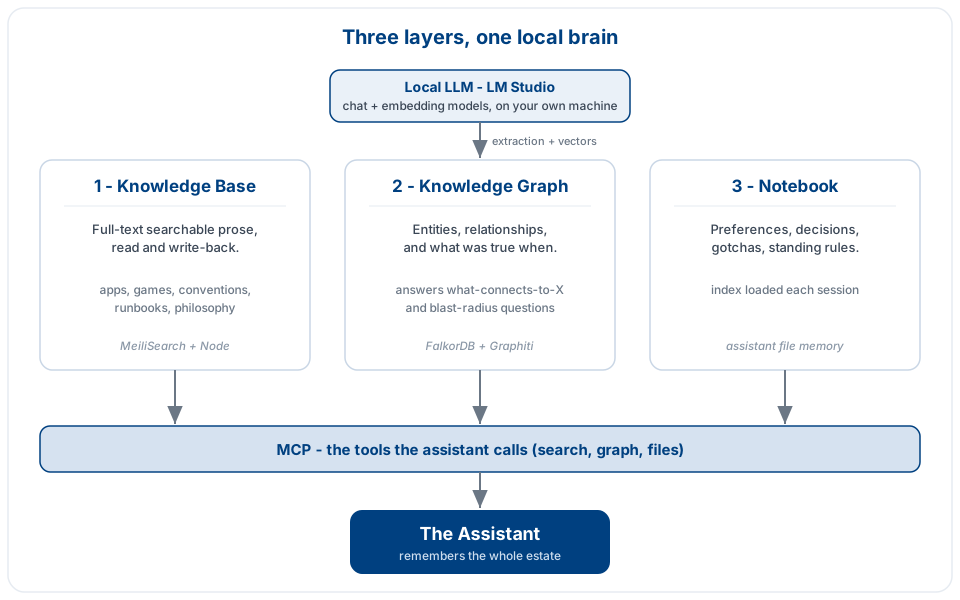
The build, layer by layer:
Knowledge base. Run a full-text search engine in a container. Put a small service in front of it that ingests Markdown from category folders, watches for changes, and serves a tiny HTTP API. Expose search, list, get, create, and update as MCP tools. The create and update tools are non-negotiable — a read-only memory cannot maintain itself.
Deletion, done right. Make the ingest reconcile removals, not just additions. When a file disappears, delete its records from the index by source path — and mark that source-path field filterable in the startup code, not at runtime, or a restart will silently undo you. Then prove a real delete actually leaves the index. Do not trust the log.
Graph. Run a graph database. Drive a temporal-graph framework with your local model. Three things you must do to make a local model work: use the plain chat-completions client and ask for explicit structured output; swap in a passthrough reranker because small models do not return log-probabilities; and add a deterministic write path so that when you know a fact exactly, it is written exactly, with no model improvisation. Pin reads and writes to the same database namespace or you will fill a room you cannot see into. Expose add-fact, search, entity-lookup, and stats as MCP tools.
Notebook. Use your assistant’s native file memory. Keep one index file that loads every session and points at the detail files. Put preferences, decisions, and gotchas here.
Keep it alive. Write a standing instruction that says: route durable facts to the right layer automatically, supersede rather than contradict, correct at the source. Add an end-of-turn hook that nudges a sync check. This is what stops the whole thing rotting.
Make it resilient. Buffer writes you cannot complete (because the model is down) into durable storage, and flush them on recovery so nothing is lost. Optionally, let the assistant start the local model server itself when a write needs it — start only, never stop, with a fallback to buffering. And learn to check liveness by exercising the real work endpoints, because “the server answered” is not the same as “the model is loaded.”
Lock it down. Treat the store as security-sensitive rather than a dev convenience, for the reasons I described above. Bind every service to localhost, not to all interfaces. Do not expose the database’s browser UI. Put real credentials on both stores and keep them in the OS keychain, out of the repository. Keep the data on a mounted volume that outlives the container, snapshot before you touch anything stateful, and back up on a schedule. Reachable is rewritable; unbacked is gone.
That is the entire recipe. Three stores, one local brain, a maintenance reflex, a paranoid streak about logs, and a lock on the door.
What I would tell past me
Two things, really.
The first is that the local-model path is worth the extra evening. Yes, the cloud one is smoother out of the box. But a memory you own outright, that costs nothing to query and never leaves your machine, is a different category of thing from a memory you rent. I will use this constantly precisely because there is no meter and no exposure. That changes the behaviour completely.
The second is the one the deletion bug beat into me, and it generalises far past this project: trust the state, not the story. The log that says “purged.” The server that says “models: yes.” The write that returns success. Every one of those is the program telling you what it meant to do. Go and look at what actually happened. The whole memory system is, in a sense, an elaborate machine for not having to trust my own memory — so it would have been deeply on-brand to build it on the back of trusting a log line that was quietly lying.
Anyway. The goldfish has a hippocampus now. Built it at my own desk, runs on my own hardware, remembers the whole estate, and occasionally tells me I am wrong. I could not be more pleased.
Footnotes
-
I started a project to recreate the 1985 classic Rescue on Fractalus! as a HTML canvas/JavaScript version. I dropped this project when Strataris effectively superseded it. ↩
-
The extraction model is Google Gemma 4, the 12B variant — in LM Studio the identifier is
google/gemma-4-12b. Gemma (ai.google.dev/gemma). Sadly, on my 36GB M3 Max, this is the biggest model I can comfortably run. I need an upgrade. ↩ -
The embedding model was Nomic Embed Text v1.5, which produces 768-dimensional vectors — in LM Studio the identifier is
text-embedding-nomic-embed-text-v1.5. Nomic Embed Text v1.5 (Hugging Face). ↩