Announcing Nomen: AI Screenshot Renamer
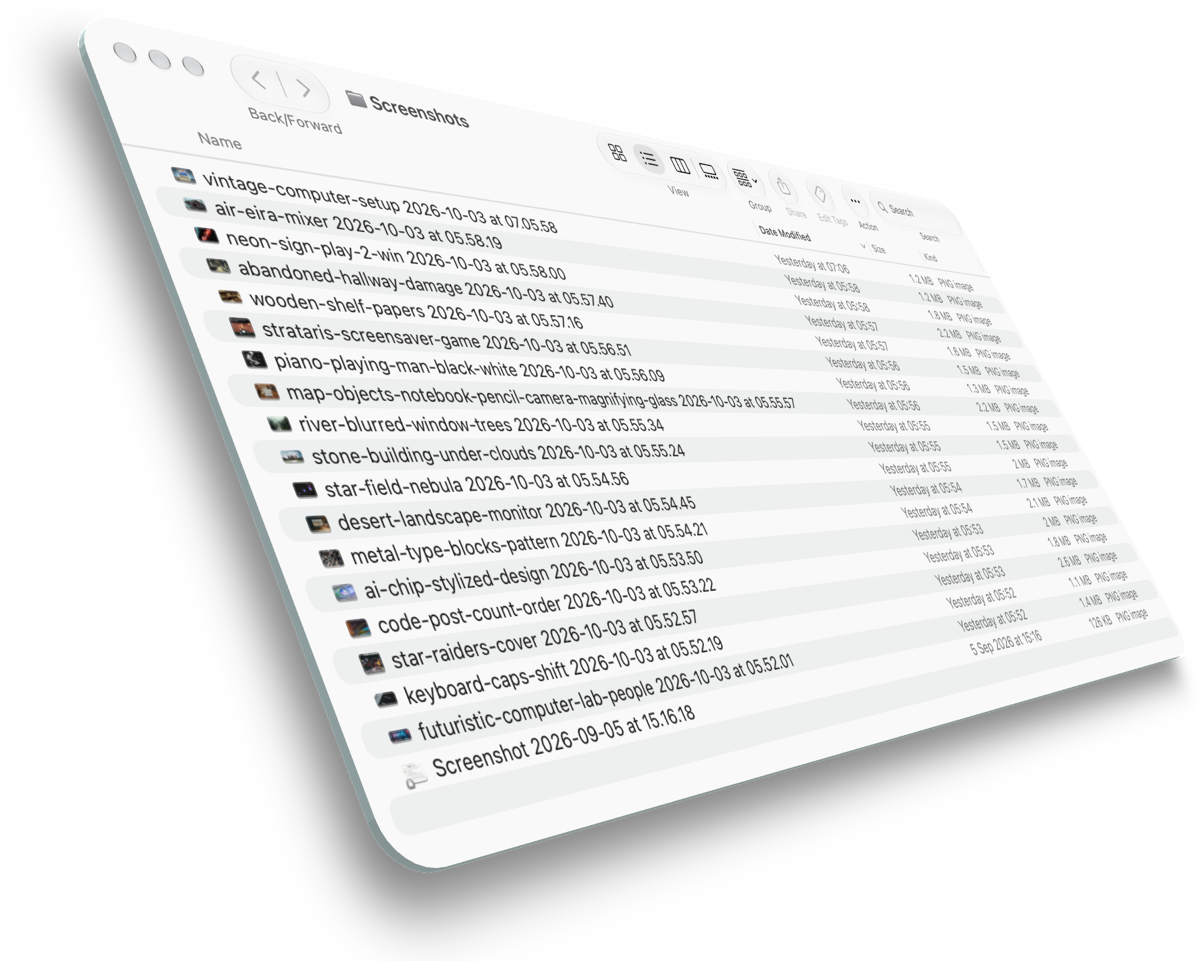
I take a lot of screenshots, and every one of them is called something like Screenshot 2026-10-01 at 14.04.21.png. That name tells me when I took it. Finder already shows me when I took it, in a column right next to the name.
What I actually want to know, three weeks later, is which one was the error message.
Nomen is out, and it fixes that. Take a screenshot the way you always do, with shiftcommand4 or any of its siblings, and a few seconds after macOS saves it, it gets a name that says what is in it. Some it came up with for me this week: wine-cellar-barrels, toll-booth-barrier-stand, clock-two-faces-building, star-raiders-cover.
I didn’t think of this
The idea came from Nevorago’s AI Screenshot Renamer, which does the same job in the browser. You drop in up to ten screenshots, it suggests names, you edit them and download a ZIP. It’s nicely done, and its site says your images are processed temporarily and not stored.
I believe that. I still didn’t want to send them.
When I scrolled back through my own screenshots folder, the trouble was obvious. It is mostly conversations with colleagues, code snippets and error messages from work. A screenshot is a picture of whatever happened to be on the screen, and you rarely choose what else was in the frame. Thus I’d argue these are some of the most sensitive files on my Mac, and I make them without thinking.
So the question became whether the Mac could do it alone.
The model was already here
It can now. Since macOS 26, Apple silicon Macs with Apple Intelligence turned on carry a language model that apps are allowed to use, and in macOS 27 it can look at images as well as read text. It runs on the machine. There is a second model in the same framework that runs on Apple’s servers, and Nomen never touches it, because that would defeat the point.
That makes Nomen the first Jorvik app to use Apple Intelligence. Save Cannes already uses Vision to find faces in photographs, but that is a different sort of machine learning, and there is no language model anywhere in it.
The plumbing was the easy part. macOS marks every screenshot it saves, on the file itself, with what kind of capture it was and the exact rectangle of the screen you grabbed. So Nomen doesn’t need to guess from the filename, which changes with your language and settings, and it can tell which app you were capturing by looking for the window that sat under that rectangle. It can’t simply ask which app is in front, because the file only arrives about 5 seconds after you take the picture, once the little floating thumbnail has gone, and by then you’ve probably clicked on something else.
Then Vision reads the text, the model looks at the screenshot and the text together, and out comes a name.
It called the Pentagon “main-image”
The first build worked, technically. It caught every screenshot, read the text, and handed out names. Most were fine. Some were not.
Then I screenshotted a photograph in a news story. An aerial view of the Pentagon, no text anywhere in it, but about as recognisable a building as exists. Nomen named it main-image.
My first assumption was that the image wasn’t reaching the model at all. So I gave the same model the same file and asked it to describe it, nothing more. It came back in 1.6 seconds with “An aerial view of the Pentagon building in Washington, D.C.”
It could see perfectly well. I had told it not to look.
My instructions asked for a filename built from specific words that appear in the screenshot, starting with the app name. That is a sensible instruction for a screenshot of an error dialog. For a photograph with no words in it, it pointed the model at the only words available, which were the name of the news app, and left it nothing to say about the picture. So it said nothing, with hyphens.
The fix was to split the job in two. First the model describes the screenshot in one plain sentence. Then a second request turns that sentence into a name. I tried both approaches on nine real screenshots, and describing first won every time except one, where they tied. The Pentagon became pentagon-aerial-view, and a photo of a man in black tie stopped being news-screenshot, which was true but no help to anybody, and became man-in-tuxedo-street. The cost is about half a second.
It made other mistakes on the way. One early test, of a terminal window with no error in it anywhere, came back as ghostty-update-error. A small model will occasionally invent a word, and I don’t think any prompt removes that entirely, so every rename can be undone from the menu, and Nomen remembers the last twenty across restarts. The last issue was the app name kept leaking into photographs: a picture of a smart speaker on a wooden table became jorvik-daily-news-tablet-speaker, as if Jorvik Daily News were part of the scene. The app is now given to the model as context, to be mentioned only when the screenshot is actually about that app, such as its error message or its settings.
The details
It renames only the screenshots you take while it is running. It will never go back through a folder you already have, because a bulk rename of things you didn’t ask about is the one mistake undo can’t comfortably fix. It follows whichever folder macOS saves screenshots to, so if you have moved yours with shiftcommand5, it follows you. Two screenshots of the same thing get -2, -3 and so on. And if you like your dates, there is a setting to have them appended to the end of the name.
It needs no permissions in the usual setup.
On a Mac without Apple Intelligence it still works, just more plainly. It names the screenshot after the app and the first few substantial words it can read, which is less elegant but never makes anything up.
Get it
Nomen is free, like everything I make. macOS 14 or later, universal binary, signed and notarised installer or zip, source on GitHub, updates through the built-in updater. Or, in one line:
brew install --cask perpetualbeta/jorvik/nomen
The model needs an Apple silicon Mac on macOS 26 or later with Apple Intelligence turned on, and it looks at the picture itself from macOS 27.
Nomen is Latin for name. A Roman citizen usually carried three: the personal one, the family one, and often a third, the cognomen, which tended to start life as a description. Naso meant big nose. Cicero is generally said to come from the word for a chickpea. The Romans worked out a long time ago that the quickest way to reach a name somebody will remember is to describe them first.